![logo-mark-primary-color-4.png]](https://support.apicbase.com/hs-fs/hubfs/logo-mark-primary-color-4.png?height=40&name=logo-mark-primary-color-4.png)
What the integration does
- Your Conway assortment and your own prices arrive in Apicbase as ingredients with Conway packages, linked to your outlets. Prices and availability are updated every night.
- Orders you send in Apicbase go to Conway electronically. Conway does not get an order email.
- Order confirmations, changes, delivery notes and invoices do not come into Apicbase. You receive your Conway deliveries as usual.
Getting connected
Ask Conway for your customer number for each outlet that orders from them. Then:
- Go to Library Settings and open the Supplier Integrations tab. You need the Manage suppliers permission.
- Switch on Conway.
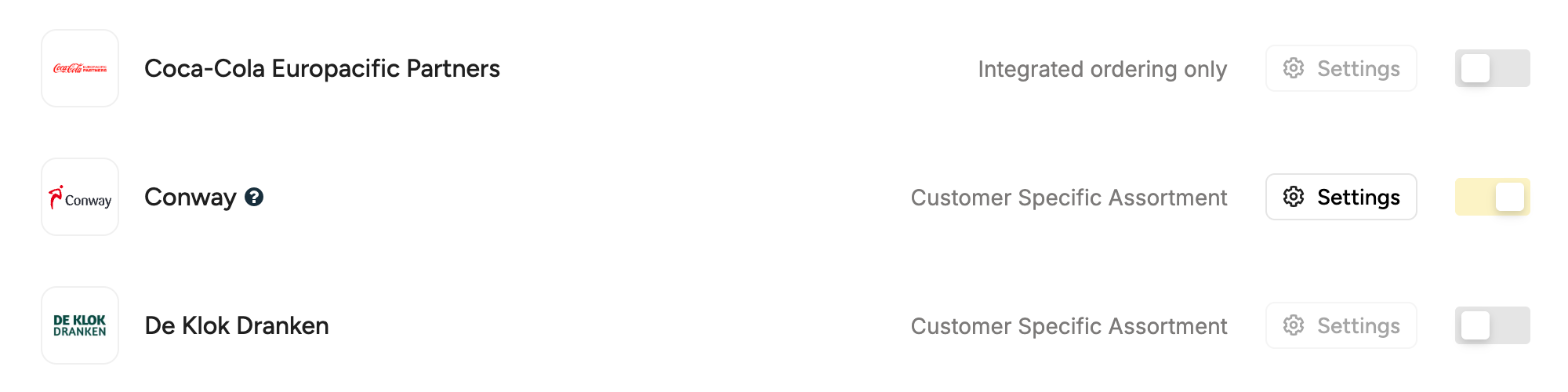
- Open Conway on the Suppliers page and link the outlets that order from Conway on the Outlets tab.
- On the Outlet Ordering Details tab, enter the Conway customer number for each outlet under Customer Numbers and under Assortment Sync ID, and select Save.
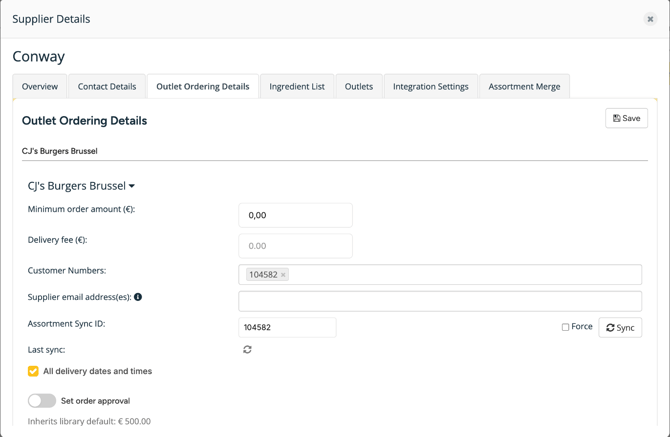
Your Conway products appear after the next nightly update. Nothing arrives until Conway has set up your customer number on its side.
Ordering from Conway
Create and send the order as usual. Choose a delivery date and the outlet's customer number: Conway needs both on every order. Once sent, the order shows the status Sent and you get a copy by email. Conway order numbers look different from your other orders, for example A1BC-C2D-E3F.
Conway does not send a confirmation back to Apicbase, so the order keeps the status Sent.
If you cancel an order in Apicbase after sending it, also let Conway know. The cancellation does not reach Conway.
Contact
For your customer number, products or prices, contact Conway. For anything in Apicbase, contact support@apicbase.com or your Customer Success Manager.