![logo-mark-primary-color-4.png]](https://support.apicbase.com/hs-fs/hubfs/logo-mark-primary-color-4.png?height=40&name=logo-mark-primary-color-4.png)
1. General Information
- Scope: Spuntini is a foodservice wholesaler in Belgium. With the integration, your Spuntini assortment, with your own prices, is loaded into Apicbase and kept up to date. Orders you send to Spuntini in Apicbase go directly to Spuntini.
- Region: Belgium
- Website: https://www.spuntini.be/nl-be
2. Product Assortment
- Assortment type: customer specific. You get the products Spuntini makes available for your customer number, at your prices.
- Updates: Spuntini sends changes to Apicbase, and Apicbase processes them every night. New products appear in your library and prices are updated.
- Assortment management: to add or remove products, contact Spuntini. Products that Spuntini marks as unavailable can no longer be ordered.
| Information | Available |
|---|---|
| Product name | Yes |
| Spuntini article number | Yes |
| Packaging | Yes |
| Price | Yes, your customer price |
| Orderable status | Yes |
| Brand | No |
| GTIN (barcode) | No |
| Allergens | No |
| Nutritional information | No |
| Lead times | No |
3. Ordering Details
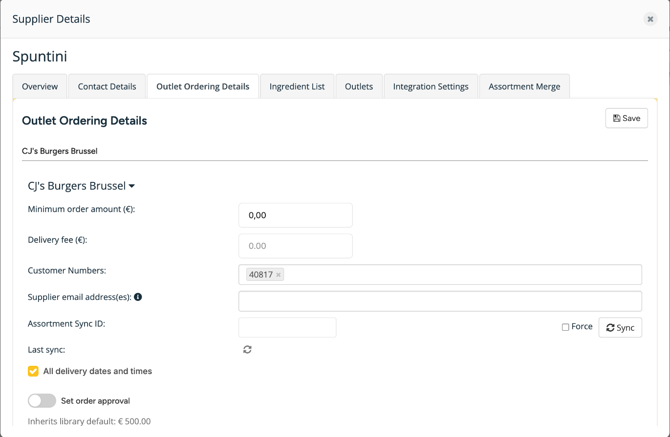
Create an order for Spuntini as you do for any supplier and select the customer number of the location on the order. When you send it, the order goes straight to Spuntini. Spuntini's order desk also receives it by email.
Spuntini keeps the Apicbase order number as the reference for your order. After you send it:
- Spuntini confirms an accepted order by email.
- If Spuntini cannot deliver the order or part of it, Spuntini contacts you directly.
- Spuntini can replace a product with a promotional alternative.
Follow up your orders with Spuntini: their order updates are not shown in Apicbase. No confirmation from Spuntini? Check the customer number of the location and contact the Spuntini order desk.
4. Onboarding
Apicbase switches Spuntini on per library: ask your Customer Success Manager to switch it on for you. Then add the Spuntini customer number of each location yourself, on the supplier's Outlet Ordering Details tab under Customer Numbers. You find the number in your Spuntini account or on your Spuntini invoices. If you cannot find it, ask Spuntini at bestellingen.deerlijk@spuntini.be.
5. Contact Information
- Orders, deliveries and your assortment: bestellingen.deerlijk@spuntini.be
- Anything in Apicbase: support@apicbase.com or your Customer Success Manager