![logo-mark-primary-color-4.png]](https://support.apicbase.com/hs-fs/hubfs/logo-mark-primary-color-4.png?height=40&name=logo-mark-primary-color-4.png)
How to Connect
Following the instructions in the PoS Integrations article, you should navigate to the Integrations Tab in your outlet settings.
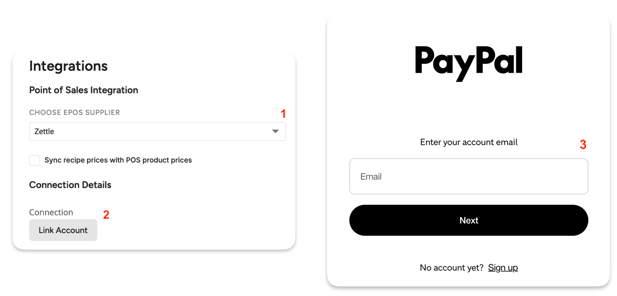
To begin, look for Zettle in the list of PoS suppliers (1), then click on Link Account (2). This will open a second tab in your browser where you will be able to log in to your PayPal account (3). With this, you are all set, but don't forget to click Save in the top right corner of the screen!
If an error occurs when trying to log in to your PayPal account, first ensure that you are using the right credentials. If the issue persists, contact your Apicbase CSM or the support team.
Once your PoS is connected to your outlet, you can move on to the next steps, as explained in the PoS Integrations article.