![logo-mark-primary-color-4.png]](https://support.apicbase.com/hs-fs/hubfs/logo-mark-primary-color-4.png?height=40&name=logo-mark-primary-color-4.png)
Table of Content
1. How to Connect
Following the instructions in the PoS Integrations article, you should navigate to the Integrations Tab in your outlet settings.
To begin, look for Sitedish in the list of PoS suppliers (1).
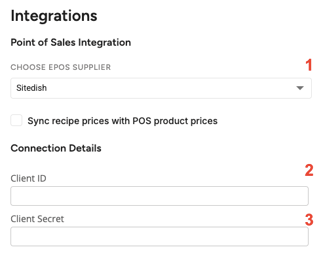
In order to connect Sitedish, you will need the Client ID (2) and Client Secret (3) of your Sitedish account. You can request this from your Sitedish account manager. Don't forget to click Save in the top right corner of the screen!
If an error occurs when trying to connect, first ensure that you have the correct Client ID. If the issue persists, contact your Apicbase CSM or the support team.
Once your PoS is connected to your outlet, you can move on to the next steps, as explained in the PoS Integrations article.
2. Contact Information
For issues with the PoS connection, you may contact your Sitedish Account Manager, info@sitedish.nl, or your Apicbase CSM for assistance.