![logo-mark-primary-color-4.png]](https://support.apicbase.com/hs-fs/hubfs/logo-mark-primary-color-4.png?height=40&name=logo-mark-primary-color-4.png)
Table of Contents
1. Adapt Menu Cycle Instances for Specific Dates
Menu cycles create a repeating schedule of recipes across a defined period. Each repetition becomes a menu cycle instance mapped to specific calendar dates. You can adjust planned recipes and quantities for a specific date without changing the full cycle definition.
1.1. Edit recipes on a specific date
Use this approach when you want to change what is served on specific days only, such as a holiday closure or a special menu. Some typical examples include:
-
Remove all planned recipes because the outlet is closed on a public holiday
-
Reduce planned quantities because fewer guests are expected
-
Replace a planned recipe with a seasonal or special dish
How it works in practice:
-
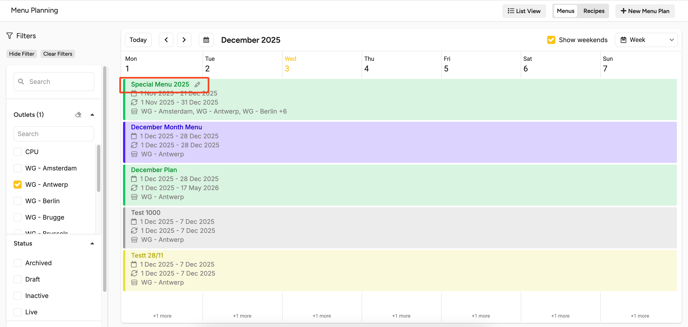
Open the calendar view for menu planning and navigate to the dates you want to adjust.
-
Click the menu cycle instance that you would like to update:
- In Edit mode, you can:
a. Remove planned recipes for that date. Click "⋮" for the option to clear the entire day.
b. Add replacement recipes
c. Adjust planned quantities (portions) per recipe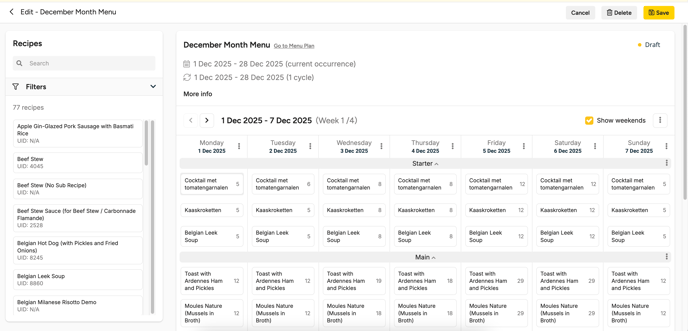
-
Save your changes.
1.2. Decide the scope of your change
When you edit a menu cycle instance, Apicbase prompts you to choose how broadly the changes should apply:
-
Only this cycle
-
This and all following cycles
Choose “Only this cycle” for one-off changes like holidays. Choose “This and all following cycles” when the repeating plan needs to change going forward.
1.3. Best practices for holidays and exceptions
-
If the outlet is closed, remove the planned recipes for that date instead of setting quantities to zero.
-
If the menu stays the same but attendance changes, adjust quantities only.
-
If you introduce a one-time special dish, replace the recipe for that date but keep the rest of the week untouched.
2. Planning Centrally vs Planning per Outlet: How to Manage
Menu planning can be managed centrally (for multiple outlets) or locally (per outlet). Which approach you use depends on your operational setup and where quantities are determined.
2.1. Planning per outlet (standard approach)
Use this when each outlet is responsible for its own forecasting and quantities.
Typical workflow:
-
Each outlet maintains its own menu cycle and fills in planned quantities.
-
Outlets generate orders or production plans from their own scheduled quantities.
-
The internal supplier outlet aggregates inbound demand and plans procurement and production centrally.
This approach works best when outlets have autonomy and local differences in demand.
2.2. Planning centrally (central kitchen / HQ approach)
Use this when menu planning and forecasting is coordinated by a central team (for example, a CPU producing for multiple locations).
Typical workflow:
-
A central team creates and maintains menu cycles linked to multiple outlets.
-
Planned recipes and quantities are managed centrally.
-
Orders and production plans are generated by selecting date ranges across the outlets served.
-
Outlets consume the planned menus but do not need to maintain planning quantities themselves.
This approach is most efficient when the same menu is served across locations and production is centralized.